离线播放Offline playback
音乐和界面字体都在你的电脑上,应用不连任何服务器。导入之后,断网也照常播放。 Your music and the app's fonts live on your computer, and the app talks to no server. Once imported, it plays with the network off.
 SNK
音乐播放器Music Player
SNK
音乐播放器Music Player
macOS + Windows · 完全离线macOS + Windows · fully offline
导入自己的 MP3,按歌单和环节排好,每首歌从你指定的那一秒开始。现场不连 Wi-Fi,也不登录账号。 Import your own MP3s, arrange them into playlists and cues, and start each track at the exact second you choose. No Wi-Fi, no account.
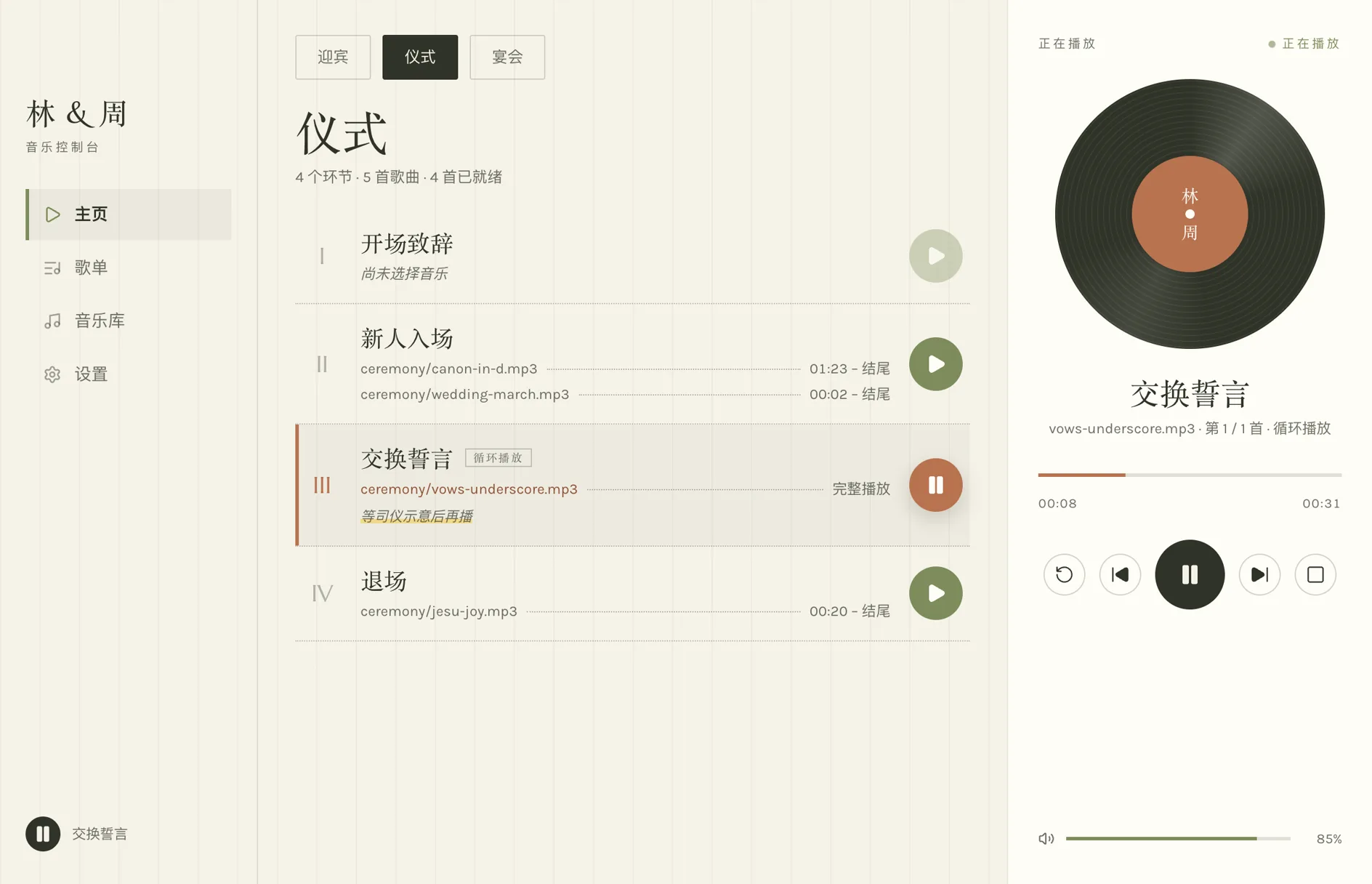
音乐和界面字体都在你的电脑上,应用不连任何服务器。导入之后,断网也照常播放。 Your music and the app's fonts live on your computer, and the app talks to no server. Once imported, it plays with the network off.
迎宾、仪式、宴会各建一个歌单,歌单里排环节,每个环节按顺序放好几首歌。环节之间不会自动连播,下一段由你亲手开始。 Make a playlist for the welcome, another for the ceremony and another for the reception, then add cues to each. Cues never run into one another — you start the next one when the moment comes.
进行曲太长,就从该进场的那 20 秒开始;定好结束点,结尾自动收住。整个环节可以一直循环,等流程走完再手动切下一段。 A long processional can start at the second the couple walks in and end at the second you set. Loop the whole cue until you are ready to move on.
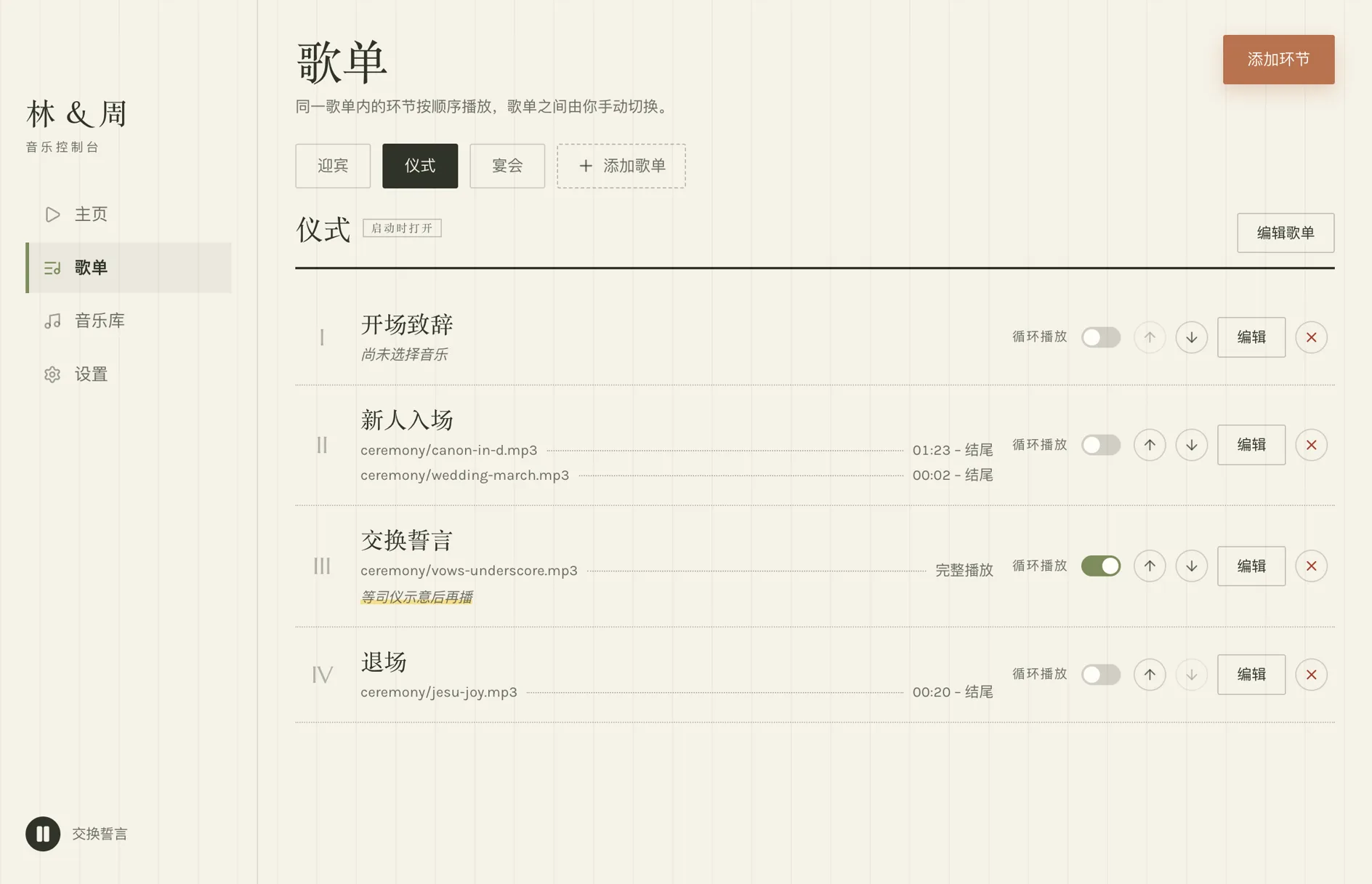
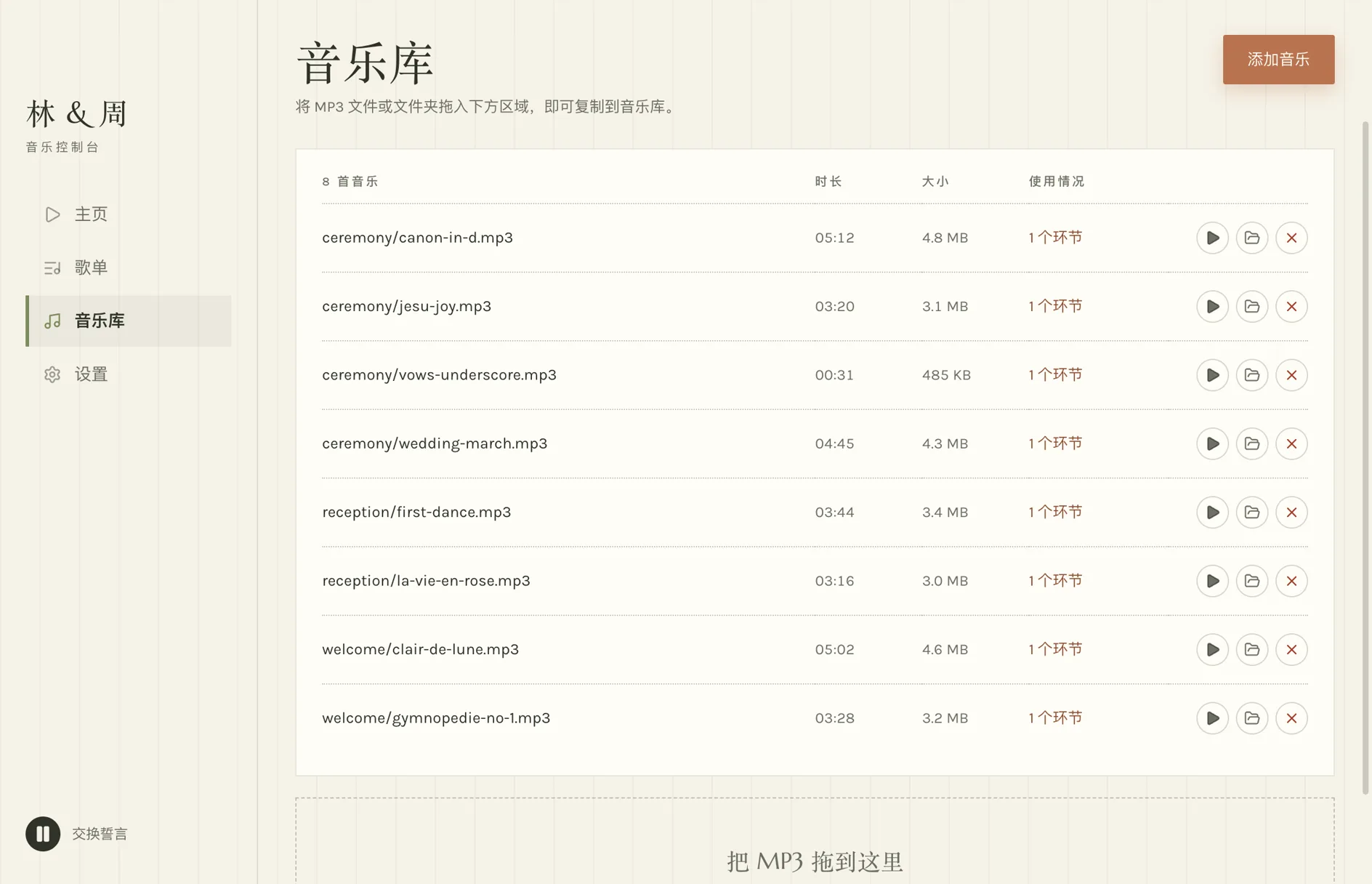
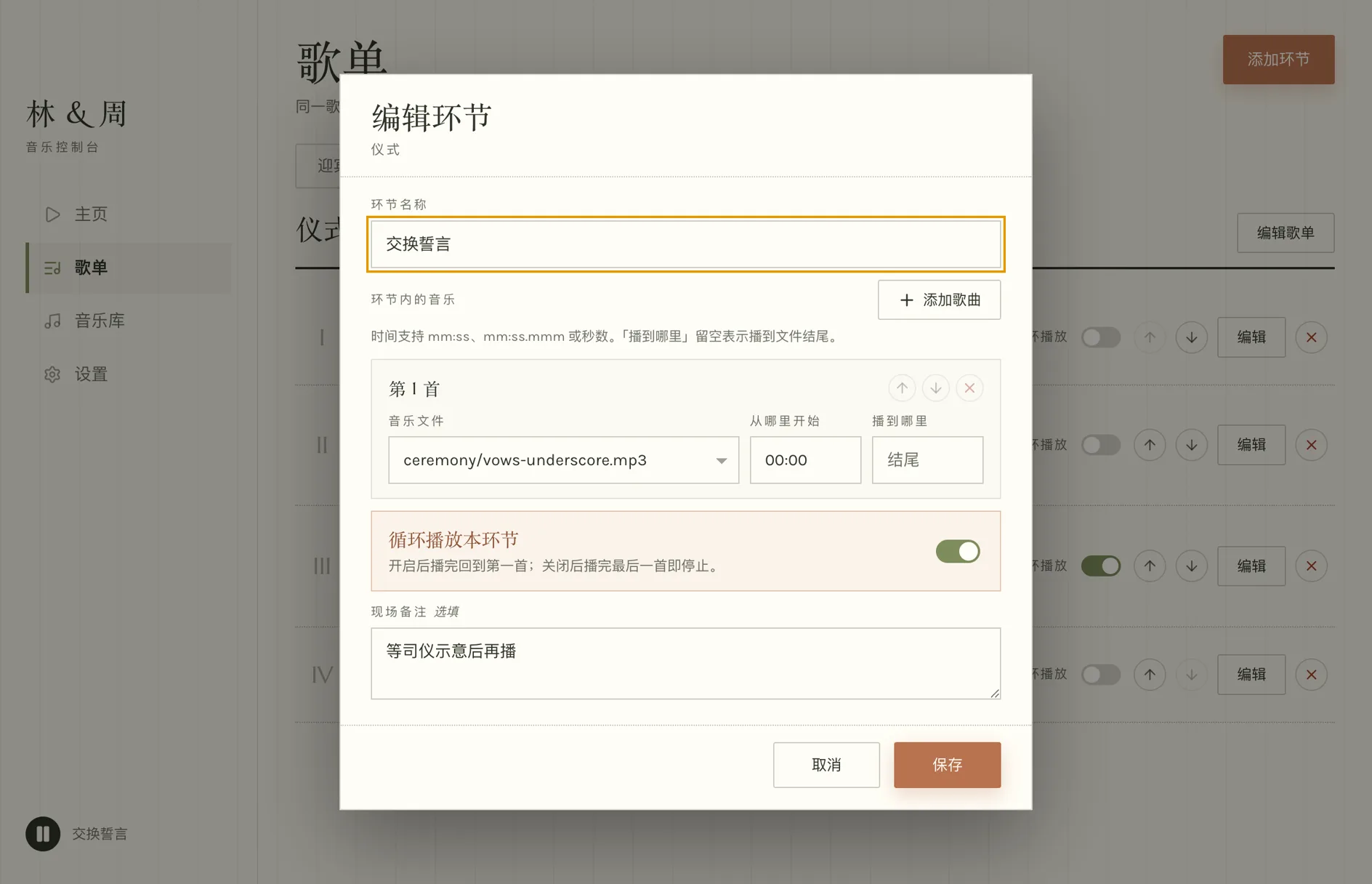
真实截图 · 午夜丝绒主题Real screenshots · Midnight Velvet theme
在这里调整环节顺序、设置循环、填写现场备注。循环开关立即生效;曲目和播放顺序的改动,会在下次手动启动环节时生效,不会打断正在放的音乐。 Reorder cues, set looping and leave notes here. The loop switch takes effect straight away. Changes to tracks and their order apply the next time you start the cue by hand — never mid-song.
拖入 MP3 或整个文件夹,即可导入音乐。列表会显示每首歌的时长、文件大小和使用它的环节数。删除音乐时,文件会移到废纸篓,用过它的环节会提示,等你重新选一首。 Drag in MP3s or a folder to import your music. Each row shows a track's length, file size and how many cues use it. Deleting moves the file to the Trash, and the cues that used it are flagged until you pick another one.
为环节里的每首歌设置起播和结束时间。开启循环后,整个环节会从头再放一遍。填写现场备注,提醒主持人或负责播放的人。 Set where each track in a cue starts and ends. With loop on, the whole cue plays again from the top. Leave a note for the host or the person running the music.
羊皮鼠尾草、午夜丝绒、胭脂纸、照片卡四套主题。灯光昏暗的宴会厅适合午夜丝绒;照片卡用新人照片替换唱片。Four themes: Vellum Sage, Midnight Velvet, Blush Paper and Photo Card. Midnight Velvet suits a dim banquet hall; Photo Card swaps the record for the couple's photo.
一个 zip 装下整场婚礼:歌单、全部 MP3、新人照片和外观。留作备份,或者带到婚礼当天用的那台电脑上。One zip carries the whole event: playlists, every MP3, the couple photo and the look. Keep it as a backup, or take it to the laptop that runs the wedding.
每次保存都会留一份上一版。万一文件读不出来,应用会明确报错、原样保留,绝不覆盖。Every save keeps the previous version. If the file cannot be read, the app says so and leaves it untouched — it never overwrites it.
空格播放或暂停,Esc 停止,点 ↺ 从环节开头重播。macOS 的「正在播放」和 Windows 的系统媒体键同样可用。Space plays or pauses, Esc stops, and ↺ restarts the cue from the top. macOS Now Playing and the Windows media keys work too.
版本 2.1.1 · 发布于 2026-09-10 Version 2.1.1 · released 2026-09-10
macOS 13 或更高版本macOS 13 or later
1736761989e8590e
a123290e51b8b05b
已用 Developer ID 签名并经 Apple 公证,正常双击安装即可。 Signed with a Developer ID and notarized by Apple — it opens the way any app does.
Windows 10 或更高版本(64 位)Windows 10 or later (64-bit)
451586544de747d5
Windows 版还没有代码签名,首次安装 SmartScreen 会弹「Windows 已保护你的电脑」——点「更多信息 → 仍要运行」。装完可以用下面的 SHA-256 核对文件。 The Windows build is not code-signed yet, so SmartScreen shows “Windows protected your PC” the first time — choose More info → Run anyway. Check the file against the SHA-256 below if you like.
在下载目录里执行 shasum -a 256 <文件>(Windows:certutil -hashfile <文件> SHA256),输出应与下表一致。
Run shasum -a 256 <file> in your downloads folder (Windows: certutil -hashfile <file> SHA256) and compare.
| snk-music-player-2.1.1-arm64.dmg | 1736761989e8590ee7ea9d2cfe93cbd5b23ef38570c9bb822e2bf7e827528e03 |
|---|---|
| snk-music-player-2.1.1-arm64.zip | 022345bdbd2c18c295fe6bf3eb66a596cd43ac161a32bddc53d7254486db4ad9 |
| snk-music-player-2.1.1-x64.dmg | a123290e51b8b05bf8662661317c102e047dcdd88b1414c4cbcca9a80cb6d261 |
| snk-music-player-2.1.1-x64.exe | 451586544de747d562e9fa693c384cef283dd496b6da4b4045e40417447bd6ed |
| snk-music-player-2.1.1-x64.zip | 8ec89b53b4867f7bf48fbed02d83488867fe8435325ff21e83c4eab3fbc88b61 |